
Selecting office computers (Commercial PCs) is a significant strategic decision for IT and procurement departments. It goes beyond a simple hardware purchase, impacting employee productivity, data security, and total cost of ownership (TCO).
This article outlines strategy for selecting commercial-grade computers. The focus is on durability, stability, and ease of management, ensuring your IT investment achieves maximum return. We will detail appropriate component selectionincluding CPU, RAM, Storage, and GPUand advocate for Commercial PC models which offer superior data security, longer warranties, and higher reliability than Home Use Models.
Phase 1: Defining Organizational Usage Tiers
The selection process should begin by categorizing user requirements based on their specific roles within the organization:
Tier 1 (General User): Focuses on basic document processing, email communication, and standard online conferencing.
Tier 2 (Power User / Advanced): Engages in data analysis, 2D graphic design, and software development, requiring substantial multitasking capability.
Tier 3 (Workstation / Pro User): Requires high-performance computing for intensive tasks such as 3D graphics (CAD/Modeling), 4K+ video editing, engineering simulations, and Machine Learning.
Phase 2: Essential Component Selection
Central Processing Unit (CPU)
The CPU is the core of the system's performance.
General Tasks: An Intel Core i5 or AMD Ryzen 5 is typically sufficient.
Intensive/Gaming Tasks: Recommend upgrading to an Intel Core i5/i7 or AMD Ryzen 5/7.
Graphics/Streaming: Select CPUs with a higher core and thread count.
Random Access Memory (RAM)
RAM dictates the system's multitasking ability.
Minimum Requirement: 8GB is the bare minimum for general use.
Heavy Workloads: Significantly higher RAM capacity should be considered (e.g., 32GB or 64GB) to maintain performance under load.
Solid State Drive (SSD)
The type of storage dramatically affects boot and application loading speeds.
Recommendation: NVMe SSDs must be the standard choice for all office computers to ensure fast system startup and program execution.
Graphics Processing Unit (GPU)
The GPU handles visual output and rendering tasks.
General Use: Integrated Graphics (iGPU) will usually suffice.
Gaming/Graphics-Intensive Work: A dedicated graphics card, such as an NVIDIA GeForce RTX 4060 or equivalent, is necessary. For professional environments, Professional GPUs (NVIDIA RTX A-Series, AMD Radeon Pro) are mandatory.
Phase 3: Summary of Computer Specifications by Tier
The table below provides a clear guideline for selecting specifications aligned with each usage tier
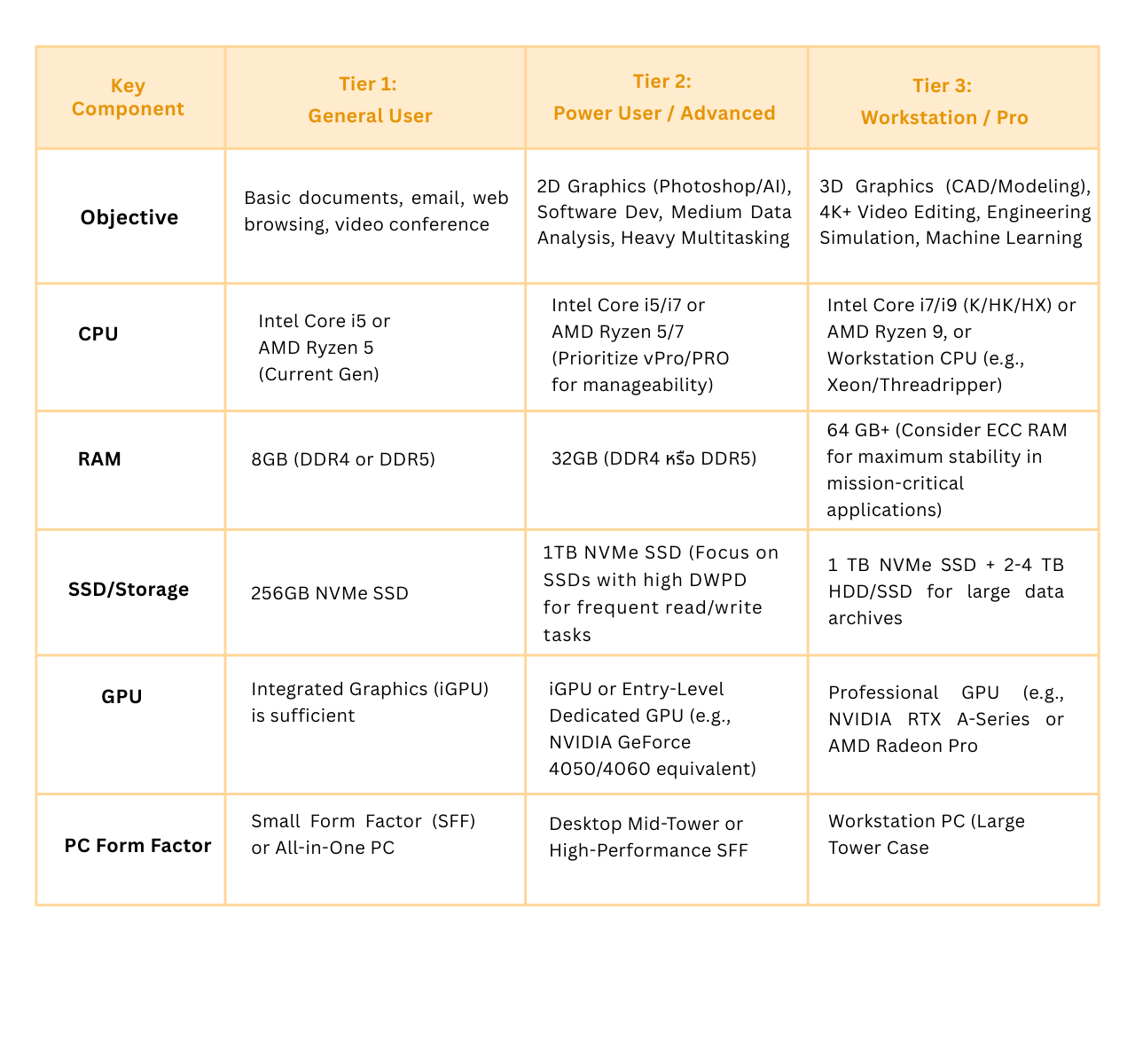 Strategic Considerations for Commercial PC Procurement
Investing in Commercial PCs, even for Tier 1 users, enables the IT department to maintain a consistent standard of security and system stability across the entire organization.
Key Procurement Measures:
Management Technology: For Tier 2 and higher, select CPUs featuring vPro/PRO technology to empower the IT department with efficient remote management capabilities.
Service and Warranty: Prioritize vendors who offer 3-5 year On-site Service warranties. This minimizes system downtime (Downtime) and ensures business continuity.
Acquisition Flexibility: Consider leasing options to allow for rapid specification upgrades. This is especially relevant in the current environment where the performance demands of AI applications are quickly evolving.